Blame!

“Blame” is a free reporting plugin for TRC to help you analyze canvassing results.  Blame provides easy pivots (“business intelligence”) on the data collected by your canvassers. This helps you answer key questions that lead to action:

  1. How many doors did your team hit per day?
  2. Who exactly did you contact and what was the result? Pull the details into excel for further analysis.
  3. How many supporters did you identify?
  4. What was the specific result for each canvasser?  Which volunteers should be rewarded and which need more coaching?
  5. Are there suspicious trends in the data?

(The name Blame comes from similar tools in the software industry that developers use to find who edited a file and introduced a bug)

Opening Blame

You can launch Blame from the plugin menu:

image

Or by appending &plugin=Blame2 at the end of your login link.

Background

TRC tracks each individual edit supplied by a user. An edit includes not only the actual change to the sheet (“voter #5472 is a supporter”), but also timestamps, geo location, user id, and even which plugin made the edit.

Basic Views

There’s a timeline chart showing you edits per day. You can use the slider bar at the bottom to zoom in on a range, such as a super Saturday.

image

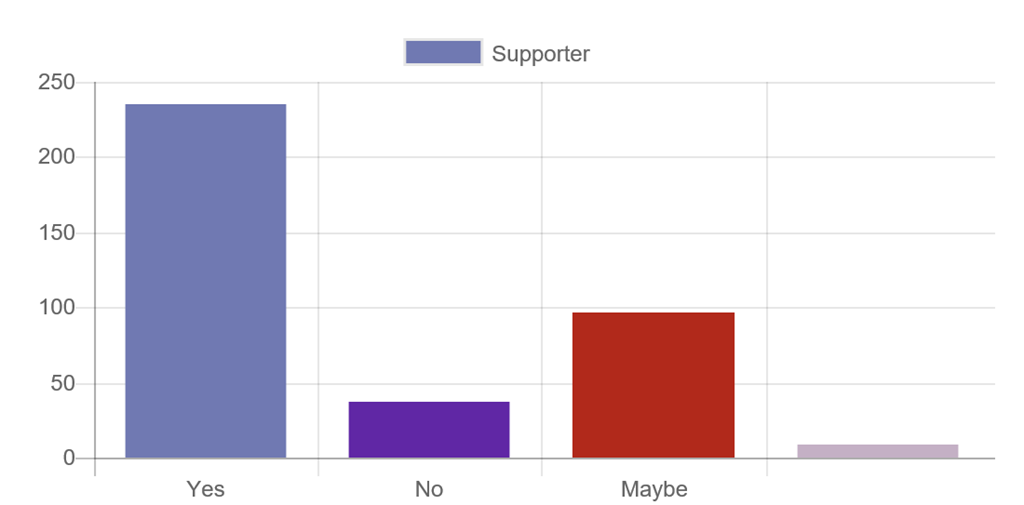
Blame provides pivots. For example, you can see number of supporters identified and by whom.

image

image

Blame also presents a “grid view” of all the individual edits. This provides a convenient way to see just the values that have changed. You can view and download all the edits in a single spreadsheet:

image

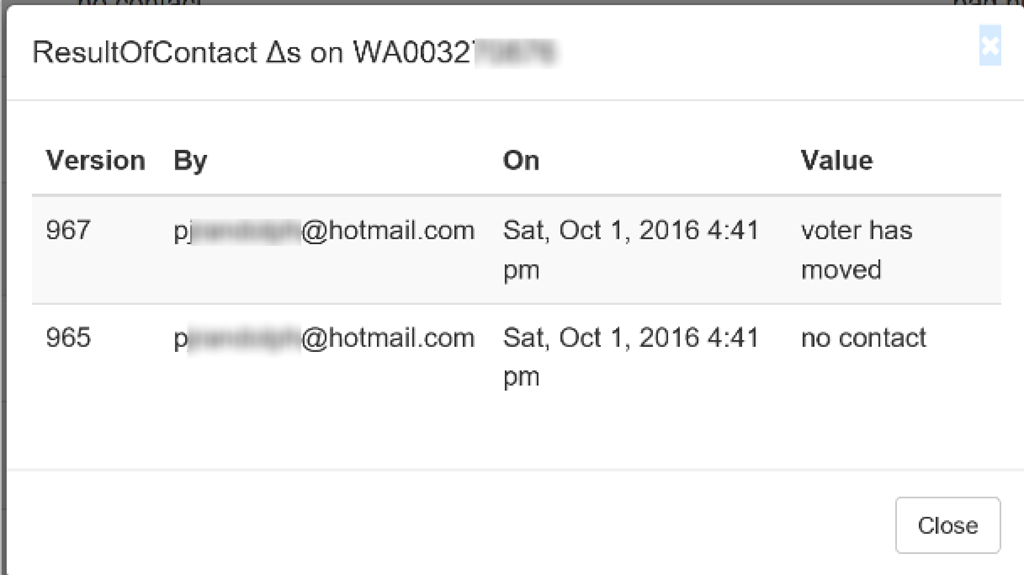
If a single record has multiple changes, blame will flag it and let you drill into more detail and see the exact history.

image

image

This can be useful to identify records changed by multiple people.

Pinned vs. Floating values

TRC is a canvassing tool that can pull data from a variety of different sources. For example:

Source Quality?
Voter names, age, addresses Secretary of State VRDB Perfect – the SOS is the source of truth.
Map view Geocoding address to get a Latitude and Longitude High – we try to get the pin right on the house.
GOTV – did you mail in your ballot? County auditor High – but there can be a lag between when the ballot is mailed and when the auditor reports it.
Voter history Secretary of State historical files Perfect
Past Precinct Results Secretary of State Perfect – although precinct boundaries and populations change over time.
Party Id Voter-Science ???

What about Party Id?

Party Id is determining which party a voter is aligned with. Democrat? Republican? Libertarian? Other?  A common convention is assigning a “party id score” that’s a scale of 1 (hard gop) … 5 (hard democrat). 3 is independent, 0 means unknown.  This is crude and deeply flawed (how do you represent people that split their tickets?), but it’s still widely used be campaigns.

While most of the data has an official source, there’s no definitive list of party identification.  So organizations that provide party id must make an educated guess based on the data they do know –  such as if you voted in the Democrat presidential primary or if your PDC donations show strong contributions to Republicans. If new data comes in, we update the guess. This gets awkward when if the first guess was right and then the 2nd guess is wrong.

Pinned vs Floating

TRC helps you cope with this uncertainty.  Most tools treat the values as static numbers. This unfortunately means you don’t know the source or confidence of a value. TRC them as “Pinned” and “Floating”.

1. Once you change a value, it is “pinned” and that changed value should never get overwritten by somebody else. (You can see the full audit history here in the History tabs or in the Blame plugin.)

2. But before you change it in TRC, the value is “floating” and can be updated underneath you when we rebuild the models.

TRC addresses this by letting you “pin” values, and by giving each user their own “sandbox” that lets them track their own specific values.

Example

We mark any Floating values with a “?” after the party id. This lets users know that it’s a guess and may change underneath you.

So for example, M Dunwiddie starts with:

image

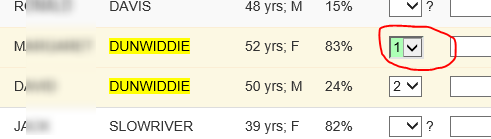
The ‘?’ means that the data can change. The 5 means our guess is hard democrat. But what if we then see that M Dunwiddie voted in a Republican primary and donated $100 to a Republican candidate? The data team could pick up that data and update the model to a ‘1’.  But even then, new data could flip it back to a ‘5’ (such as if the data team later found she donated $10,000 to a democrat). 

But regardless of what the data team does with floating values, say I then go in and explicitly change her to a 1. The cell goes green, and the question mark is now removed.
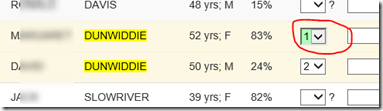
image

And when I refresh the browser, the green highlights reset but the question mark stays removed. The lack of question mark tells me the value is now “pinned” and won’t change.  This only applies to the Party column.

Practical guidance

1. Once the cell is green, it’s saved to the server. This means If the cell does not turn green, it hasn’t been saved.

2. If the party column has a “?” next to it; the value may change on you.  This means if it has the correct value, but has a ‘?’ next to it, then go in and deliberately change it and make it turn green. That will pin the correct value.
Ballot Chase!

Washington State is a vote-by-mail state and voters have about 3 weeks before the election to mail in their ballots.  Voter-Science tracks the ballots that are received and provides several tools to aide in your Get-Out-The-Vote (GOTV) efforts.

1) The GOTV Reports

Voter-Science provides GOTV reports – see the Turnout Report  plugin. Note – your account must be enabled for Ballot chase in order for this to plugin to work.

This report includes useful information like:

  • voter turnout statistics
  • breakdowns by party and targets
  • breakdown by result of canvassing
  • identified supporters that haven’t yet voted
  • pre-precinct breakdowns
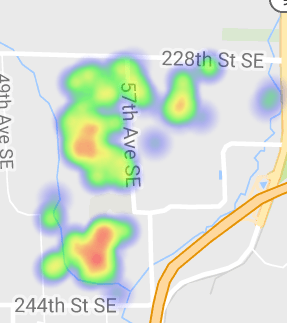
  • and even heat maps of turnout:

image.png

2) Names are crossed off in the List View

For example, in the screen shot below, Nancy and Marvin have already voted and so their names have been automatically crossed off.

image

This is critical for get-out-the-vote: if somebody has already cast their ballot, no need to contact them further for gotv.

3) Mobile app tells you the ballot received

The mobile apps will tell you the ballot is received

4) Usage with Filters  

Ballots are tracked by creating a new “XVoted” column in your sheet.  It’s a ‘1’ if the ballot has been received. You can also use the Filter tool to filter on XVoted just like any other column and use that to create custom heat maps (Supporters that haven’t voted) or specific child sheets.

For map users, a common “Targeted voters” filter is “IsFalse(XVoted) && IsTrue(XTargetPri)”.   This means “only include people whose ballot is not yet received and who are on the targeted list”. 


Technical details

There is some delay between when a person puts their ballot into the mail, it’s received by the county auditor, and the auditor reports having received it. This is tracked per-county, and counties report at different speeds.  This means that if you see a name crossed off, you can be confident the ballot was received.

Can you win with 49%?

If voters are 50% likely to vote for you, you obviously have a 50% of winning the election. But what are your odds of winning if voters are only 49.9% likely to vote for you?

Let’s do the math …

The Model and Assumptions
For simplicity, assume that all voters have the same percent P of voting for you. In practice, this more resembles just the “swing” voters, and you will have different categories of voters such as your “base” that is very likely to vote for you and your opponent’s “base” that will never vote for you. But this simplification is still sufficient to illustrate the concepts.
So if P = 50%, obviously you have a 50% chance of winning the election.

But what if P drops to 49.5%?  Perhaps there’s a natural bias against you due to party, etc.  Certainly, your odds of pulling an upset and winning are still greater than 0. But it’s not still 49.5% either. So what are the odds?

Doing the math
We’ll  compute these numbers using a Monte Carlo simulation.  Source code is available at: https://github.com/MikeStall/BasicMonteCarlo
Say the district size is N. If N=5000 people, dropping P from 50% to 49.5% support means your chances of winning the election would drop from 50% to about 23%!  And when P drops to 49%, odds of victory are 7%.

Here’s a chart showing the full curve.  The horizontal axis is P (the % that an individual voter will vote for you).  The vertical axis is the % that you’ll win the overall election (assuming population size 5000.)

Picture

Note that this is not linear! Your chances of winning are not just P*N.

How does this depend on population size?
It turns out due to the Law of Large numbers, this curve gets even sharper as the population size (N) increases.  The law of large numbers means that the larger your sample size, the lower a chance of anomalies occurring. It’s easy to flip 2 heads in a row (25% odds). It’s less likely to flip 10 heads in a row. (.1% chance).   In this case, winning an election when P < 50% is “anomaly”.
Say voters are 49.9% likely to vote for you. Your odds of winning drop off rapidly as the population increases.

Picture

Summary
1. If voters are only 49.9% likely to vote for you, you still have a chance of winning the election. But it’s a steep dropoff (the blue chart).
2. The chances drop rapidly with population size (the red chart)
3. A 49% – 51% election result is actually a solid loss if the population is large.

Voter Database Decay Rate

How much should you pay to keep your data up to date? How much does it cost you to use stale date?

Let’s look at a real example using the voter database (VRDB) provided by the secretary of state. This tells you the voters in your district and a campaign uses this to know who to contact for voter outreach. This perhaps the most critical piece of data for any campaign.

Suppose it costs you $1 to mail a postcard to a voter. If 1000 voters have moved out of your district and can no longer vote for you, you’d arguably be wasting $1000 to continue sending them postcards asking for their vote.

So not updating your copy of the voter-database costs you money in wasted resources. But ingressing a new copy of the voter-database costs you something too. So where’s the sweet spot? How frequently do you need to refresh your copy of the voter database?

Don’t guess! Let’s measure it …

1. Establish a “difference function”
We must establish a difference function to compare to tables (or CSV files).  This is somewhat arbitrary, but we’ll count the “decay” as the number of deltas to convert the first file into the second. The difference function should be symmetric.

We’ll count the following as differences:
– if a voter is in one file but not the other. This may mean a voter has moved into the district or left the district.
– If a voter has changed (such as a different last name or different precinct number). This may mean the voter has moved within the district or changed their name.

If the two files have N1 and N2 rows respectively, then the maximum number of differences would be (N1+N2).

For this study, we use an implementation from https://github.com/TechRoanoke/CsvCount/blob/master/CsvCount/CsvDiff.cs

2. Get the data
Here, we’ll look at VRDBs from Oct’12 through Feb’16.  Voter Databases can be obtained from the Secretary of State at http://www.sos.wa.gov/elections/vrdb/

3. Apply

Here’s the result of applying the difference function. We start with Oct’12 and use that as a baseline, and comparing each VRDB back it.

Picture

Picture

Picture

4. Observation and Analysis
Within 1.5 years, there were over a million differences. If it costs $1 a contact, that could be potentially wasting $1 million in a statewide campaign by operating with stale data with a VRDB that’s even 2 years out of date.

We’d expect the decay to slow down and not be linear. Once a person moves, subsequent moves don’t count as additional differences. For example, say person X starts in precinct p1 in Jan’14, moves to precinct p2 in June ’14, and then moves to precinct p3 in Dec ’14. That’s only 1 total difference from Jan’14 to Dec ’14 (moving from P1 to P3) even though there were 2 moves.

5. Next steps?
Possible future explorations here:

  1. Refine the difference function. Is there an ideal difference function?
  2. Rrepeat with more data
  3. This was for Washington state. Compare to other states.
  4. Compare the vrdb decay rate in urban vs. rural counties.
  5. Analyze the empirical data and correlate it with specific events. For example, why was their a decrease in voter registration records in Mar’14.
  6. Develop a theoretical model and match to the empirical data here.

Analytics Blog Entry Contest with a Cash Prize

Voter-Science is hosting a contest with a $500 cash prize! The winner will be announced at the TechRoanoke conference on May 14th. You can register for the conference here.

The challenge is to write a blog entry demonstrating data, statistics, and analytics as applied to the campaign or political sphere. Possible ideas:

  • Propose an algorithm for rating the quality of predictions on party id.
  • Show statistically which is easier: winning a single statewide race or winning the majority of legislative seats?
  • Show a unique visualization that makes an argument on a pertinent issue.
  • See an example of showing voter database decay rate.

Articles will be judged by Voter-Science and appear on the voter-science blog. Criteria include a) technical rigor, b) innovation and relevance, c) general blog quality.

1st place prize is $500 in cash. 2nd place is $250.
Feel free to ask Info@Voter-Science.com for any clarifications.

Entries must be submitted to Info@Voter-Science.com by May 12 8am PST.

Success in the Age of Populist Politics

Welcome to the age of populist politics. Donald Trump and Bernie Sanders have upended traditional politics on both ends of the political spectrum.
Love him or hate him, the conservative establishment has ignored the Trump phenomenon at their own peril. For months, we’ve heard how Trump was going to self-immolate at any moment. How his supporters are crazy bitter clingers. How Trump wasn’t a serious candidate. Now he’s the Republican front runner.

In the Democratic camp, the political party bosses have done everything to put out the flames of the Bernie Sanders revolution in favor of the establishment pick: Hillary Clinton. However, her numerous problems ranging from Benghazi to email servers has disenfranchised many in the traditional Democrat voting base. At Republican caucus locations across Washington, there were even reports of Democrat defectors attending to switch to the Republican party.

The political landscape is shifting out from underneath the traditional political order. A populist revolt is afoot in our great nation that will re-write the rules of politics. Zibignew Bryzenski is on the record stating that the world has never been more politically awake and engaged than it is now. Voters are engaged, angry, and ready for change that goes beyond the normal “throw the bums out”. The old order has been turned on its ear, and the old rules no longer apply.

The mantra, “Know your voter”, has never been more apt.

Voter Science was formed to help candidates and activist groups navigate the stormy seas of electoral politics. The upending of traditional politics heralds an age of opportunity for those able to seize upon it. Those who win in this new environment will be those who best understand and connect with the needs of the electorate and make effective use of data, tech, and analytics.

In order to be successful, hear are some things to consider:

  • Be relevant to connect with the voter: the same old tired talking points are not going to cut it anymore.
  • Drop the clipboard and go mobile: use electronic means to capture data while canvassing or phone banking
  • Own your brand: some Presidential candidates failed to lock down their own internet domain names (e.g. Donald Trump’s takeover of http://www.JebBush.com). Be sure to claim your name in cyberspace before your opponent does.
  • Be smart and use data: use data to micro-target voters and focus your campaign’s efforts
  • Be willing to risk in order to learn: A/B testing is at the heart of email and direct marketing. Constantly test and refine your messaging and your reach throughout the campaign cycle.